16 May 2021
How to upload a sidebar banner to your Dafont profile
A sidebar banner is a great way to advertise a business or increase...


A sidebar banner is a great way to advertise a business or increase affiliate earnings when customers click on them. Sidebar banners can be used on either side of a webpage, usually in the space otherwise left unused. Font Bundles has all sorts of banners ready to be uploaded to websites.
To upload a Font Bundles sidebar banner to your Dafont Contributor account, go to “My Account” and then click on “Personal Campaign”.

Next, click on “Choose File” and upload the banner file which can be found here.
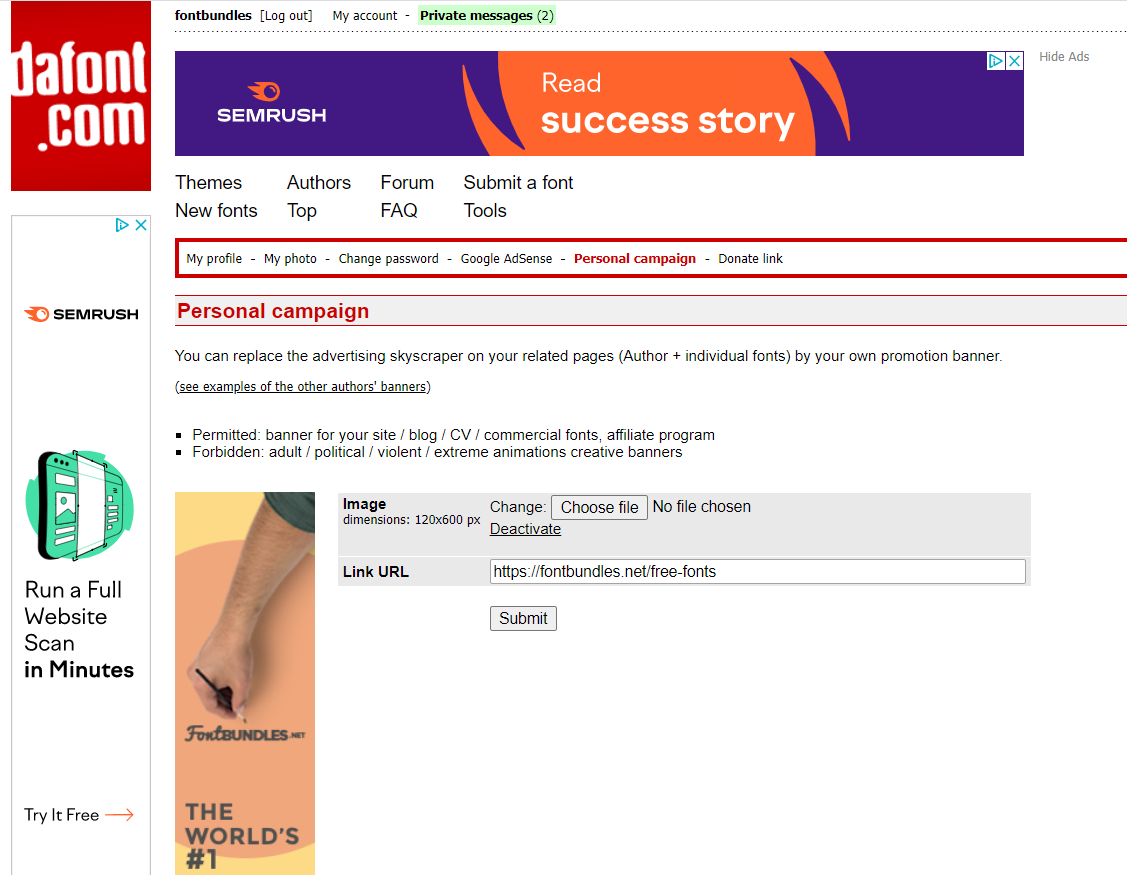
Finally, add the URL, https://www.fontbundles.net/to the “link URL” box.This will send people to Font Bundles anytime the banner is clicked on.
If you have an affiliate link, you will want to add it to the end of the URL to cash in on any purchases they make during the next 30 days.