By Design Bundles
How To Find Fonts on Your PC
You’ve downloaded and installed your font and now it’s time to design! Finding fonts on your PC is essential when creating designs. You’ll want to know what fonts you have and how to preview your fonts to see which one fits best for your design.
There are tons of great free fonts with commercial use on Font Bundles to get you started! Some of our favorite premium fonts to use are Pinsetter, Wild Mango, and Farmhouse Lemonade.
Step 1 - Open Start Menu and Search “Fonts”
Press the Windows key on your keyboard or click the Start button on the desktop to open the Start Menu. Type “fonts” and click on Font settings.

Step 2 - Install a New Font or Select a Font to View
A list of all your available fonts will appear. On the Fonts screen, you can drag and drop font files to install the fonts, search for a font by name, or click on a font to preview and learn more about it.

Step 3 - Preview Font or Uninstall Font
Click on a font to open its information page. You can type in some text on the specific font page and change the font size to preview what the font would look like. You can also uninstall the font from here by clicking the Uninstall button.

Additional Method for Finding Fonts on Your PC
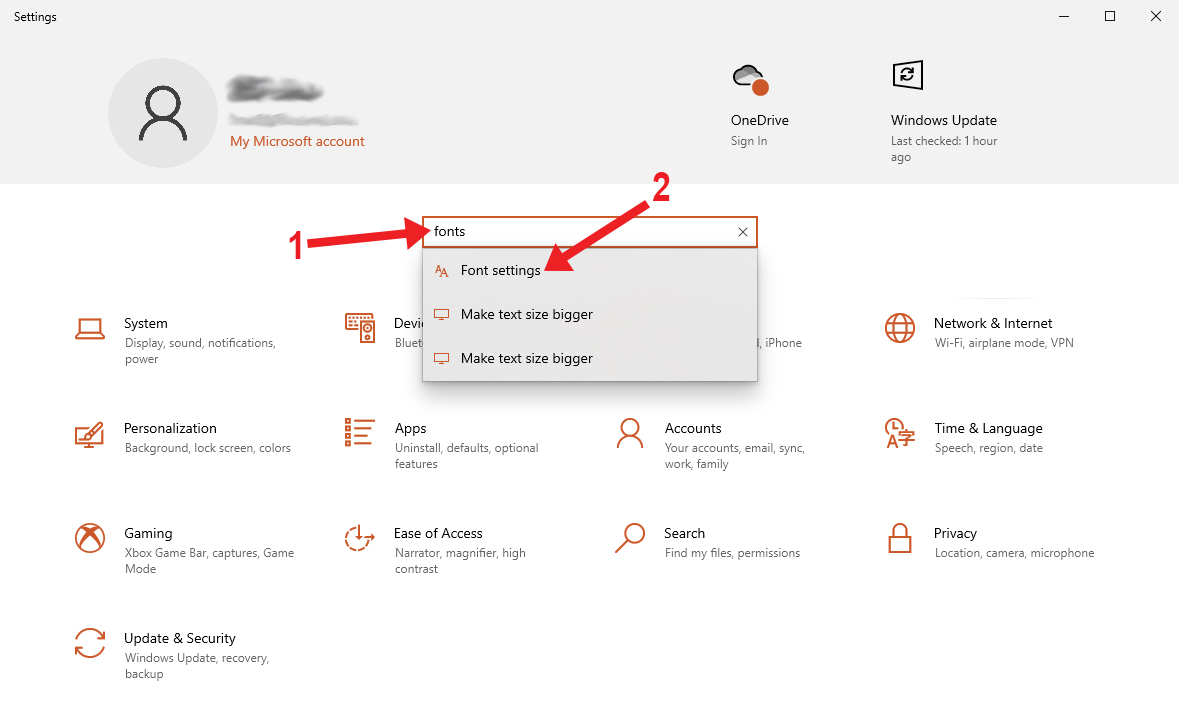
You can also locate your list of fonts by opening your Windows Settingspanel and searching for ‘fonts’ here. Select ‘Font settings’ to view the same list of fonts as shown above.
Now that you know how to find fonts on your PC, you may want to learn how to keep your fonts organized. You can also take a look at our guide on how to back up fonts from your computer if ever needed.