By Design Bundles
Font Tutorials2 min
Accessing Glyphs on Your PC
Did you know lots of fonts come with extra glyphs? Sometimes these are referred to as swashes, swirls and other terminology but they all refer to the same thing - the little extras that come with the font.
To access extra glyphs on a PC you need to open 'Character Map.'Depending on your version of windows you can either search for this using Cortana

Or you can go accessories in the start menu.
Once you open Character Map it should look like this

Select the font you wish to access by using the dropdown menu.
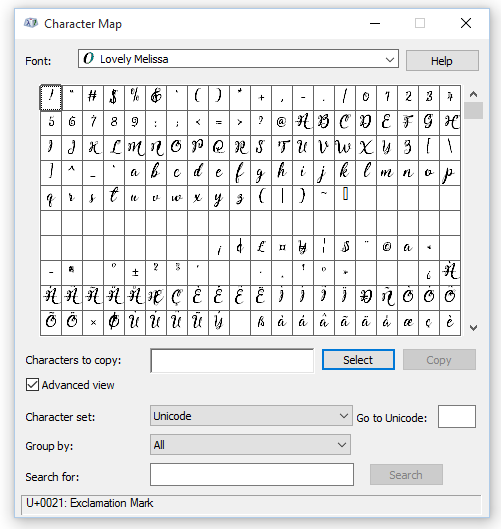
Then select your Character Set to be 'unicode'

Select the group by option and change it to 'Unicode Subrange'
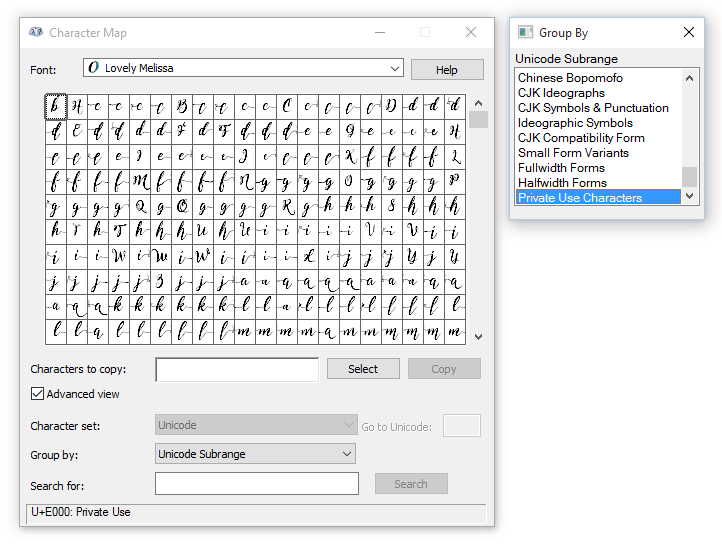
Then select 'private use characters'
Here you will now be able to access the extra glyphs of any font on windows. You can select each character to copy into your favorite program.
To access extra glyphs on a PC you need to open 'Character Map.'Depending on your version of windows you can either search for this using Cortana
Or you can go accessories in the start menu.
Once you open Character Map it should look like this
Select the font you wish to access by using the dropdown menu.
Then select your Character Set to be 'unicode'
Select the group by option and change it to 'Unicode Subrange'
Then select 'private use characters'
Here you will now be able to access the extra glyphs of any font on windows. You can select each character to copy into your favorite program.
Related Tutorials
Font Tutorials
How to Access and Use Font Glyphs on a Windows PC
Learn how to access and use font glyphs on a Windows PC with this tutorial.
Font Tutorials
Accessing Font Glyphs with Font Book on Mac
In this tutorial, learn how to access Font Glyphs on a Mac using Font Book.
Font Tutorials
Accessing Font Glyphs in Inkscape
Silhouette Tutorials
How to use Samantha Font and Accessing Glyphs
Font Tutorials
Accessing Lovely Melissa Font Glyphs
Silhouette Tutorials